

Smart trackers and fitness watches have become an important part of our health-conscious lifestyles. From monitoring heart rate and sleep patterns to tracking workouts and activity goals, these functional devices offer a wealth of insights into our well-being. This guide will walk you through the various methods of charging your smart tracker or fitness watch, ensuring it stays by your side throughout your active journey. We’ll also use the VIDVIE 2.02″Big Screen Rugged Outdoor Fitness Tracker Watch as a specific example to tell you the charging process, offering step-by-step instructions that can be applied to many smartwatches in the market. Let’s dive in and explore the different ways to keep your smart tracker charged and ready to go!
Table of Contents
Watch charging and activation

Attach the metal contacts on the back of the watch to the metal contacts of the charger, and connect the other end of the charger to the USB charging head or computer USB interface.Warm reminder: use 5V 2A charging head.
How to connect your fitness tracker watch?
1. Open the mobile client and set personal information.
2. Switch to the “Device” page and click “Bind Device.
3.Click “VlDVlE-SW1614” in the scanned device list.
4. Binding completed.
In the About interface of the watch settings menu, the watch MACaddress will be displayed, you can determine your device through the MAC address in the device list; after the watch is successfully bound, every time you open the client in the future, the watch will automatically connect to the mobile phone. Data can be synchronized by pulling down on the terminal data page.
Main function
Call
After your watch is connected to your phone you can use your watch to make or receive calls. You can also view the watch’s call history. When using the call function, make sure the connection between the watch and your phone is stable.
Voice
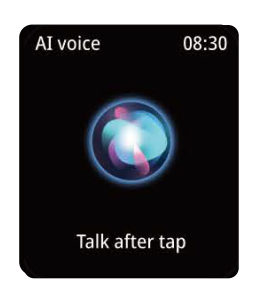
This function can be used after connecting to wireless, when you turn on the smart voice assistant, you can send instructions through the watch and let the smartphone output according to the instructions, such as calling Jack.
Heart rate
This watch can record and display your heart rate 24 hours a day. You can tap the heart rate screen to measure your current heart rate. For more detailed analysis and data logging, please check out the VIDVIE smart watch app “Da Fit‘ . The all-day heart rate needs to be turned on on the APP. The options are to detect it once every 5 minutes, 10 minutes, 20minutes, and 30 minutes.(The heart rate data is detected regularly)
Blood pressure
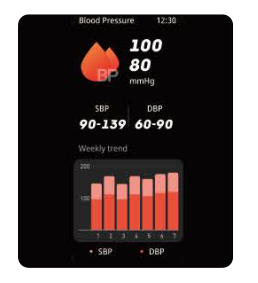
Click on the blood pressure interface to measure the current blood pressure value.More detailed information analysis and data records can be viewed in the “Da Fit” App
Blood oxygen
Click on the blood oxygen interface to measure the current blood oxygen value.More detailed information analysis and data records can be viewed in the “Da Fit” App.
Sport mode
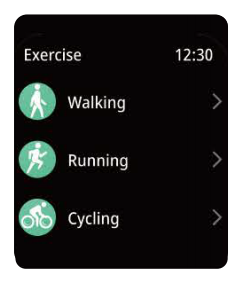
A variety of sports modes are available,including: walking, running, cycling, basketball,football, etc. More detailed information analysis and data records can be viewed in the “Da Fit” App.
Sleep mode
If you continue to wear the watch while sleeping, it can provide sleep time and sleep status to view sleep quality on the watch screen and APP. Note: The watch needs time to determine the state of falling asleep and waking up. For example, small movements such as sitting on the sofa for a long time,reading a book on the bedside, etc.The watch may determine that it is asleep. Testing hours are from 9pm to 9am.
Add component
The left row of the function page has the function of adding components. You can add any functions yourself such as after deleting the existing page, you can add the functions you frequently use for ease of use.
Smart watch sensor is good for health?
Smartwatch sensors collect your body data through technologies such as optical sensors and can track your health indicators. By detecting this data, it can help you discover potential health problems and troubleshoot them in time. Although it cannot accurately replace medical equipment, it can help you develop healthy habits.
FAQS
Q1: How is heart rate measured?
The fit watch shines a beam of light onto the skin. When the heart pumps blood, the blood vessels fill with blood. Because blood tends to absorb green light and reflect red light, the heart reflects different colors of light when it contracts and relaxes.The watch detects these reflected lights to record heart rate.
Q2: Why does the blood pressure value deviate from the sphygmomanometer?
The main parts of the body measured are different. The sphygmomanometer measures the blood pressure of the brachial artery, while the watch measures the blood pressure of the two main branches of the small arteries. The results will definitely be different.
03: How to connect your smartwatch to a smartphone?
1. Before connecting the watch, make sure to allow the smartwatch to display notifications on the phone.
2. Make sure the lock screen and notification center banners are turned on and always show previews (default).Please make sure your phone can receive notifications first.
3.Please enable application push permission on “Da Fit”
Summarize
By understanding how smart fitness trackers watche work, you can leverage their capabilities to know your workouts, improve sleep quality, and gain a deeper understanding of your overall health.