
USB is a standard technology used for connecting devices, transferring data, and delivering power between computers and peripherals, like external hard drives, keyboards, and smartphones.Understanding the differences between USB 2.0 vs USB 3.0 is important because these two versions offer different levels of performance, speed, and power efficiency. In this article, we’ll compare USB 2.0 and 3.0 to help you decide which technology is better for your needs, whether it’s for faster data transfers, device compatibility, or charging capabilities.
Table of Contents
What is USB 2.0 and USB 3.0 port?
USB 2.0 was introduced in 2000 and supports a maximum data transfer speed of 480 Mbps. While not the fastest option today, USB 2.0 is still widely used for basic tasks like connecting keyboards, mice, and printers. It’s reliable for lower-speed data transfers and remains compatible with many older devices, which is why you’ll often see USB 2.0 ports on computers and accessories.
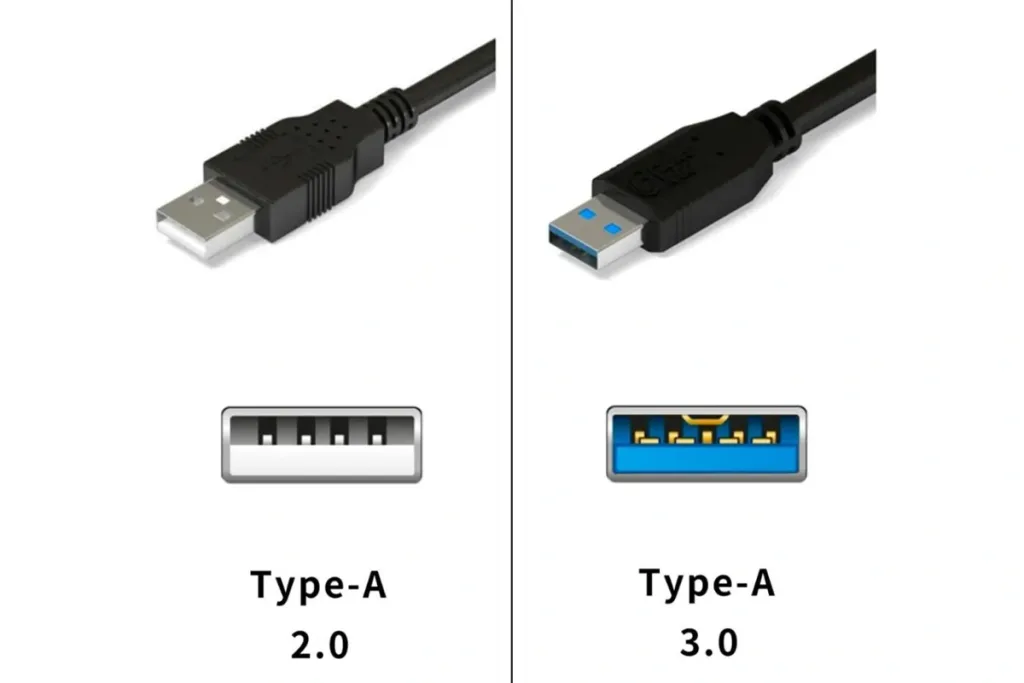
On the other hand, USB 3.0, launched in 2008, offers much faster data transfer speeds, up to 5 Gbps, making it ideal for tasks that involve moving large files like HD videos. Its distinctive blue color makes it easy to recognize. Common devices that use USB 3.0 include external hard drives, flash drives, and high-speed hubs. The faster speeds and improved power efficiency of USB 3.0 make it the go-to choice for modern computing tasks.
What is the difference between USB 2.0 and USB 3.0?
Speed Comparison
The biggest difference between USB 2.0 vs USB 3.0 is data transfer speed. USB 2.0 has a maximum speed of 480 Mbps (megabits per second), while USB 3.0 can reach speeds up to 5 Gbps (gigabits per second). This huge increase in speed makes USB 3.0 over ten times faster, which is a critical upgrade for users who need to transfer large amounts of data.
Impact on Data-Intensive Tasks: The faster speeds of USB 3.0 are especially beneficial for data-intensive tasks like transferring large media files, such as high-definition videos, or creating backups of an entire computer. For example, with USB 2.0, copying a 1GB video file could take a few minutes, but with USB 3.0, the same file could be transferred in under 30 seconds. This speed boost is also useful for other daily tasks, such as syncing smartphones or moving large folders filled with photos, making the overall process smoother and faster.
Power Efficiency and Charging Speed
When it comes to charging, USB 3.0 has a clear advantage over USB 2.0. USB 3.0 provides more power, up to 900mA, compared to the 500mA offered by USB 2.0. This means devices such as smartphones and tablets can charge faster when connected to USB 3.0. For users in today’s fast-paced world, where time is critical, this increase in power efficiency is essential. It helps to reduce charging times, so you can quickly get back to using your devices without waiting for hours. This is especially important for people who rely heavily on their phones or tablets throughout the day.
Why USB 3.0 is Better for Frequent Charging: If you’re someone who frequently charges your devices through USB, USB 3.0 is a much better option. Its higher power output means your devices will charge in less time, which is convenient for both personal and professional use. No one wants to spend extra time waiting for their phone to charge when they have a busy schedule, and USB 3.0 helps ensure you’re always ready to go.
Compatibility
One of the major benefits of USB 3.0 is that it’s backward compatible with USB 2.0 devices and ports. This means you can still use your old USB 2.0 devices with a USB 3.0 port, but there’s a catch: when you connect a USB 3.0 device to a USB 2.0 port, the performance will be limited by the older technology. In this case, you’ll only get the slower data transfer speeds and lower power efficiency of USB 2.0, even though the device supports faster USB 3.0 capabilities.
In environments where you’re using both new and old devices, it’s best to invest in USB 3.0 ports and hubs wherever possible to maximize speed and performance for newer devices. If you have to use older ports, be prepared for slower performance, but the devices will still work. Over time, upgrading your accessories and devices to USB 3.0 will provide a smoother experience, but having a mix won’t stop you from getting your work done.
Cable and Connector
There are some key physical differences between USB 2.0 and USB 3.0 cables. For example, USB 3.0 connectors typically have a blue plug inside the connector, which helps users quickly identify the newer technology. Another difference is that USB 3.0 cables usually have additional pins, allowing for faster data transfer and improved power efficiency. These differences are important for ensuring you get the best possible performance when using USB 3.0 devices.If you use a USB 2.0 cable with a USB 3.0 device, you won’t get the full speed or power benefits of USB 3.0. To fully take advantage of the faster speeds and improved power capabilities of USB 3.0, always opt for the correct cable.
Use Cases
When is USB 2.0 Enough?
For everyday tasks that don’t require a lot of data transfer speed, USB 2.0 works perfectly. For example, connecting peripherals like a keyboard or a mouse doesn’t demand high speed, so USB 2.0 is sufficient. Devices that don’t require large amounts of data or power, such as printers or webcams, also fall under this category. USB 2.0 is more than enough for these types of connections, making it cost-effective and widely compatible.
When Do You Need USB 3.0?
If you’re working with data-intensive tasks, such as transferring large video files, USB 3.0 makes a significant difference. The faster speeds—up to 10 times quicker than USB 2.0—are crucial for tasks like backing up large media files, running external hard drives, or connecting 4K cameras. Additionally, USB 3.0’s faster charging capabilities make it ideal for powering smartphones and tablets, where speed and efficiency are important in a fast-paced world.
Use Case
For users who mainly use their USB ports for basic peripherals like mice and keyboards, USB 2.0 will meet their needs. But if you’re a professional handling media production or someone who frequently transfers large files, USB 3.0 offers much better speed and power efficiency. Compatibility also plays a role—devices with newer technology, like external SSDs, will benefit significantly from the faster interface of USB 3.0.
Which Should You Choose?
For USB 2.0, it’s the affordable choice suitable for connecting basic peripherals like mice and keyboards. If your computing needs are centered around these devices and you don’t require high-speed data transfers, USB 2.0 provides a cost-effective solution that meets these simple connectivity needs.
On the other hand, USB 3.0 shines with its capability for faster data transfer, making it ideal for users who work with modern devices such as external hard drives, SSDs, and high-resolution cameras. It also supports faster charging, which is beneficial for charging smartphones and tablets quickly. If you frequently transfer large files or need to connect devices that demand higher bandwidth, USB 3.0 offers high performance advantages.
Wrap up
To wrap up this article on USB 2.0 vs 3.0, it’s essential to touch on the newer USB technologies like USB 3.1, USB 3.2, and USB4. These versions provide significant boosts in data transfer speeds and overall efficiency compared to their predecessors. We’re also seeing USB-C connectors becoming the industry standard due to their reversible design and compatibility with a wide range of devices, making them a go-to option for modern tech.
If you’re looking to keep up with the latest trends, it’s a good idea to choose USB 3.0 or newer. These technologies offer faster speeds, better performance, and are compatible with upcoming devices.
Speak to an expert about your project!
FAQ
Can I use USB 3.0 devices with USB 2.0 ports?
Yes, you can! USB 3.0 is backward compatible with USB 2.0 ports, so your USB 3.0 devices will work. However, keep in mind that the data transfer speed will be limited to USB 2.0 speeds (480 Mbps), which is much slower than USB 3.0’s potential.
What is the difference in charging speed between USB 2.0 and USB 3.0?
USB 3.0 offers faster charging speeds compared to USB 2.0. This is because USB 3.0 can supply more power to your devices, making it a better choice for charging things like smartphones and tablets quickly. In comparison, USB 2.0 takes longer to charge the same devices.
If I switch to USB 3.0 devices, do I need to upgrade my cable?
Yes, for the best performance. While USB 2.0 cables can work with USB 3.0 devices, you won’t get the full data transfer speed or power efficiency of USB 3.0. Upgrading to a USB 3.0 cable ensures you get the maximum benefit, especially for speed and fast charging.
How can I tell if my device supports USB 3.0?
You can usually tell by the blue-colored ports on your device or cable. Additionally, you can check your device specifications for the term “USB 3.0” or “SuperSpeed”. Some devices may also have the SS (SuperSpeed) logo next to the port, which indicates USB 3.0 support.